PlanningThe module where planners prepare work orders for execution: define the scope, gather requirements and prepare a work package when needed. Work is released to Scheduling after the required reviews. and SchedulingThe module where schedulers assign released work orders to technicians and time slots, considering availability, readiness and downtime windows.: helping maintenance teams prepare and schedule work.
I designed and built workflows across PlanningThe module where planners prepare work orders for execution: define the scope, gather requirements and prepare a work package when needed. Work is released to Scheduling after the required reviews., SchedulingThe module where schedulers assign released work orders to technicians and time slots, considering availability, readiness and downtime windows., Downtime CalendarThe module for reviewing and managing periods when equipment is unavailable. Events reach Scheduling after Push to ERP, so maintenance can be coordinated with those windows. and PM · Plant Maintenance OptimizationA review queue for proposed duration and frequency changes to preventive maintenance. Planners inspect the evidence and send selected recommendations to MDM. (PM · Plant Maintenance OptimizationA review queue for proposed duration and frequency changes to preventive maintenance. Planners inspect the evidence and send selected recommendations to MDM.).
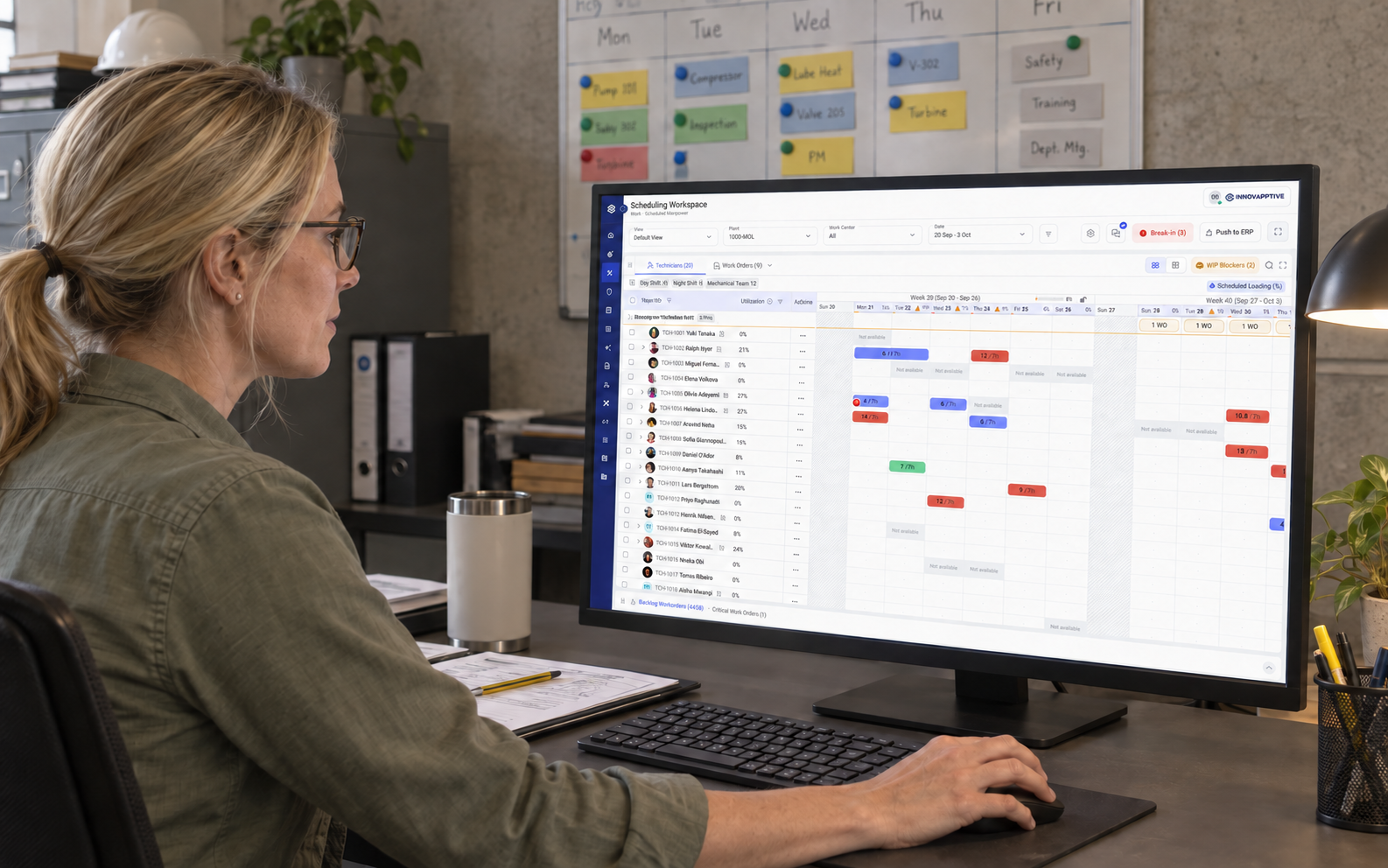
How preparation connects to SchedulingThe module where schedulers assign released work orders to technicians and time slots, considering availability, readiness and downtime windows.
What needs doing, and how?
Prepares the scope, parts and instructions so work can be released for SchedulingThe module where schedulers assign released work orders to technicians and time slots, considering availability, readiness and downtime windows..
Who can do it, and when?
Assigns released work to technicians and time slots, considering availability, ReadinessWhether the prerequisites for a job, such as materials, permits and isolation, are available. Pending prerequisites remain visible even when a scheduler reserves a future slot. and DowntimeA period when equipment is unavailable for normal operation. Maintenance work may need to fit within this window..
A Work orderThe record of a maintenance job: what needs attention, on which equipment, its priority and its status. For example: replace a pump seal. records the job, such as replacing a pump seal. A Work packageThe job instructions and requirements prepared for a work order: operations, parts, planned hours, permits, isolation and supporting documents. Not every work order needs a new package. contains its instructions and requirements. Not every Work orderThe record of a maintenance job: what needs attention, on which equipment, its priority and its status. For example: replace a pump seal. needs a new package.
Scroll sideways to read the full flow.
Discover: Understand the people and their journey.
Our team consulted in-house industry experts and existing clients. I mapped the handoffs through requirements, product discussions and stakeholder reviews, separating preparation, SchedulingThe module where schedulers assign released work orders to technicians and time slots, considering availability, readiness and downtime windows. and optimization decisions.
The people I designed for
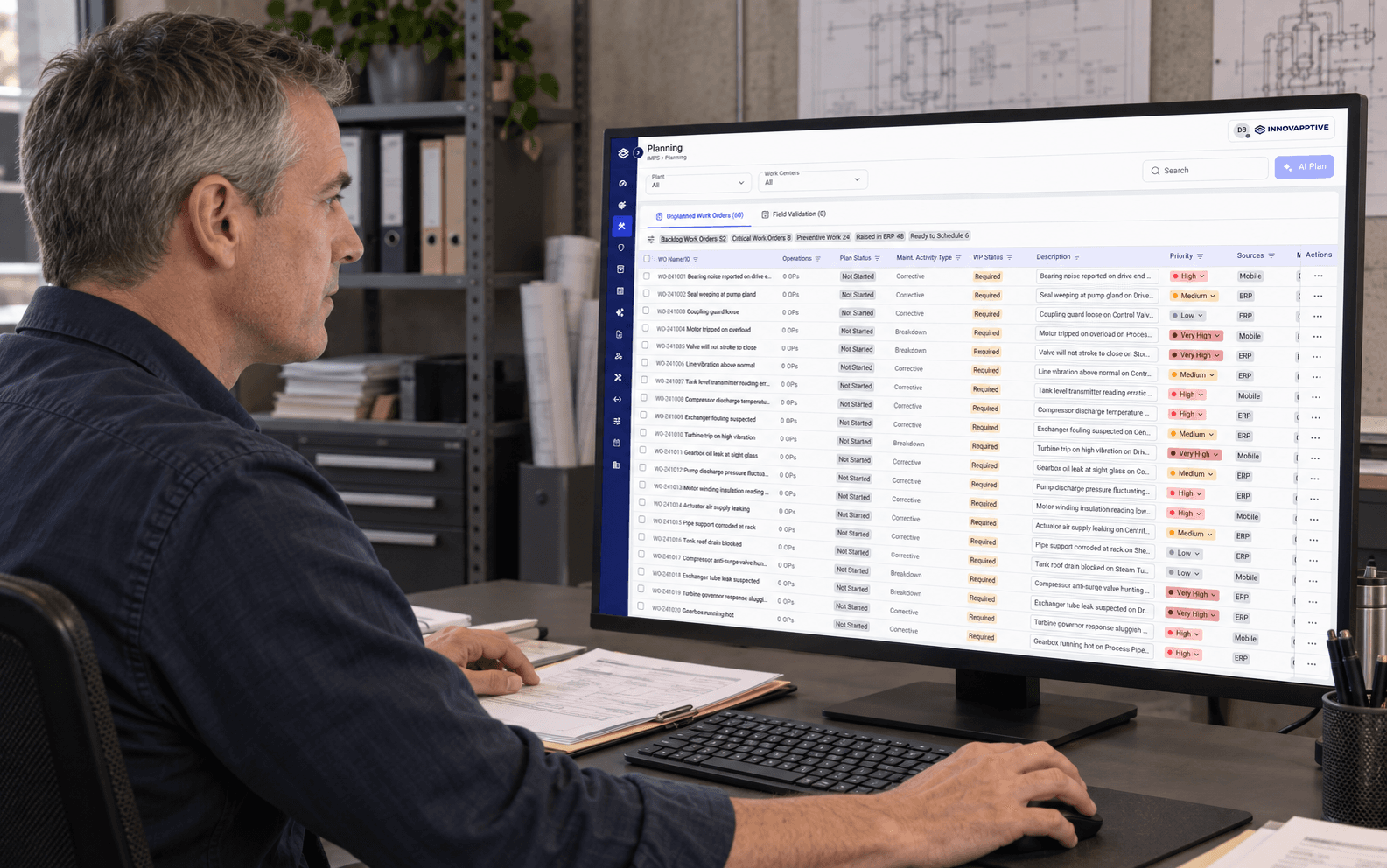
Planner
Prepares maintenance work and reviews optimization recommendations.
Make the work ready for scheduling with the right scope and requirements.
Draft packages, Field Validation and release are different states.
The customer journey
A maintenance work order moves from preparation to a reviewed schedule.
Prepare
Planner / Planning
Work OrderWork packagePrepare a work package when needed and complete required reviews.
- Problem
- Draft work must not appear released.
Check requirements
Planner / Work preparation
Required checksReady for ScheduleCheck package requirements and complete Field Validation when required.
- Problem
- Required checks can be mistaken for completed work.
Coordinate
Scheduler / Board and downtime
Capacity and downtimeScheduleConsider capacity, readiness and synced downtime windows.
- Problem
- Limited screen height hides rows and context.
Commit
Scheduler / Proposal review
Accept proposalFreeze for ERPInspect the proposal, accept it, then freeze the week when ready.
- Problem
- Accepting a proposal and ERP transfer are different commitments.
My focus: make the handoff from prepared work to a workable schedule clear.
Define: Turn the gaps into design priorities.
- Make the next step clear
Separate drafts, Field ValidationAn on-site check of the proposed work package before release to Scheduling, when required., release to SchedulingThe module where schedulers assign released work orders to technicians and time slots, considering availability, readiness and downtime windows. and MDM · Master Data ManagementThe team that evaluates proposed changes to maintenance duration and frequency. In this project's intended workflow, approved changes update affected backlog work orders or apply when Planning releases them. approval.
- Keep evidence beside the decision
Show ReadinessWhether the prerequisites for a job, such as materials, permits and isolation, are available. Pending prerequisites remain visible even when a scheduler reserves a future slot., DowntimeA period when equipment is unavailable for normal operation. Maintenance work may need to fit within this window. windows and past records where people need them.
- Fit the working environment
Use the CWP Design systemShared design rules and reusable components that help teams build consistent interfaces., preserve ERP · Enterprise Resource PlanningThe business system that holds maintenance work orders and related records. This prototype represents handoffs to that system. information and allow for smaller laptop screens.
How I organised the information
Prepare work
- PlanningThe module where planners prepare work orders for execution: define the scope, gather requirements and prepare a work package when needed. Work is released to Scheduling after the required reviews. Work orderThe record of a maintenance job: what needs attention, on which equipment, its priority and its status. For example: replace a pump seal.
- Work packageThe job instructions and requirements prepared for a work order: operations, parts, planned hours, permits, isolation and supporting documents. Not every work order needs a new package. and Field ValidationAn on-site check of the proposed work package before release to Scheduling, when required.
- PM · Plant Maintenance OptimizationA review queue for proposed duration and frequency changes to preventive maintenance. Planners inspect the evidence and send selected recommendations to MDM. review queue
Coordinate work
- SchedulingThe module where schedulers assign released work orders to technicians and time slots, considering availability, readiness and downtime windows. Scheduling backlogReleased work orders waiting to be assigned to technicians and time slots. and board
- Technicians and availability
- Downtime CalendarThe module for reviewing and managing periods when equipment is unavailable. Events reach Scheduling after Push to ERP, so maintenance can be coordinated with those windows.
Review decisions
- AI recommendations and past records
- ReadinessWhether the prerequisites for a job, such as materials, permits and isolation, are available. Pending prerequisites remain visible even when a scheduler reserves a future slot. and date exceptions
- Proposal acceptance and ERP · Enterprise Resource PlanningThe business system that holds maintenance work orders and related records. This prototype represents handoffs to that system. confirmation
Release work for SchedulingThe module where schedulers assign released work orders to technicians and time slots, considering availability, readiness and downtime windows.
Who Maintenance plannerPrepares what a maintenance job needs: its scope, operations, planned hours, parts, instructions, permits and isolation requirements. Releases work for scheduling when the required review is complete.
Follow the connected paths. Swipe across to see the full flow.
Read the paths in words
- Package needed: review work order → prepare and review package → complete Field Validation when required → Ready for Schedule → Scheduling backlog.
- No package needed: review work order → release eligible work with Ready for Schedule → Scheduling backlog.
Review a SchedulingThe module where schedulers assign released work orders to technicians and time slots, considering availability, readiness and downtime windows. date exception
Who Maintenance schedulerDecides who will do the work and when, using released work orders, technician availability, readiness and downtime windows.
Check the chosen slot against the work order’s Basic Start Date and Basic End Date.
Follow the connected paths. Swipe across to see the full flow.
Read the paths in words
- Within dates: choose a slot → continue scheduling → slot scheduled.
- Outside dates: review the exception → Schedule anyway → slot scheduled.
- Outside dates: review the exception → Cancel → work remains unchanged.
Design: Turn the design into screens.
Compare the initial ideas, explored alternatives and final designs.
PlanningThe module where planners prepare work orders for execution: define the scope, gather requirements and prepare a work package when needed. Work is released to Scheduling after the required reviews.: separate preparation from release.
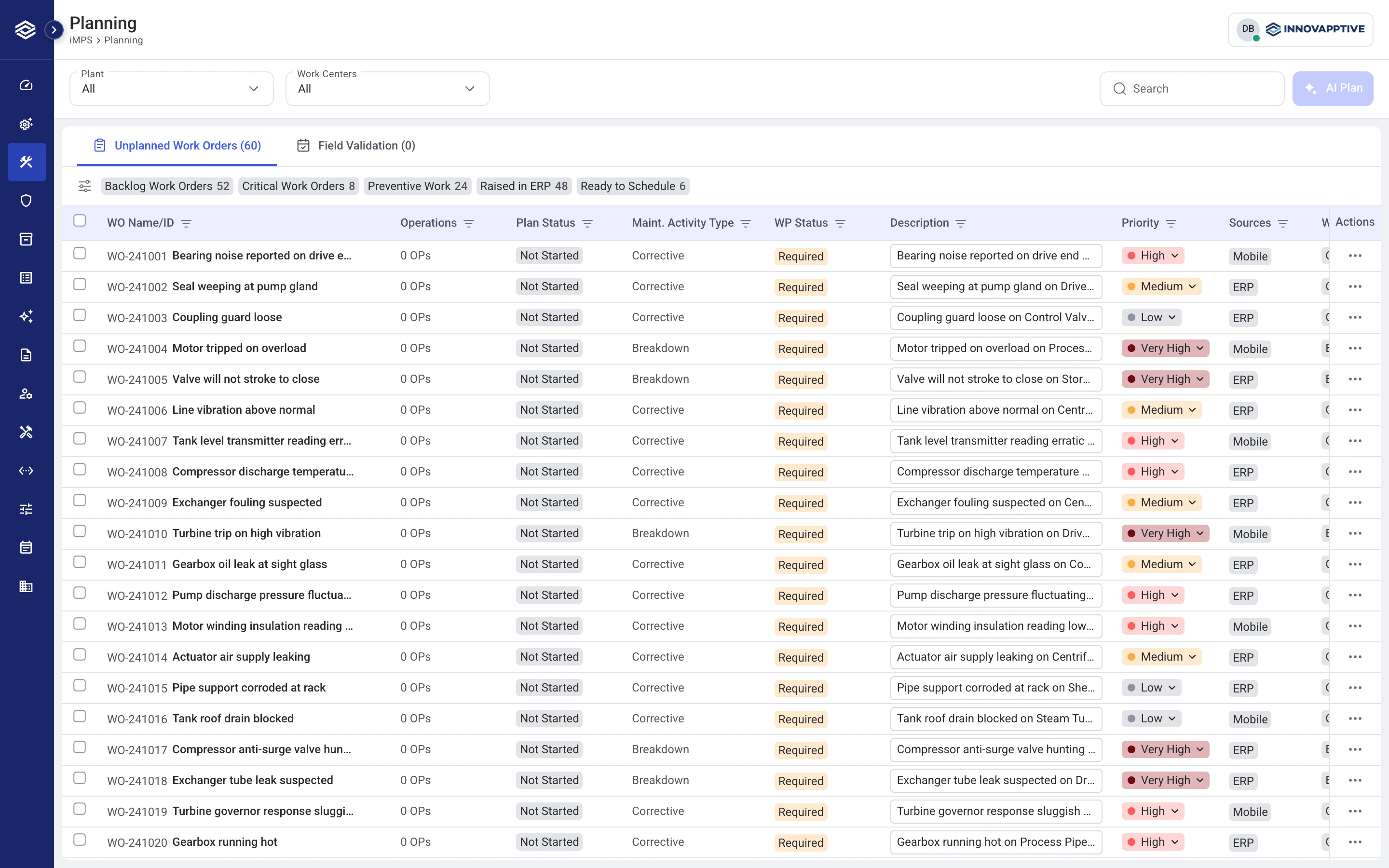
Work that needs no package can go directly to Ready for Schedule. Eligible Preventive workPlanned maintenance carried out at defined intervals to help prevent equipment failure. work can also enter PM · Plant Maintenance OptimizationA review queue for proposed duration and frequency changes to preventive maintenance. Planners inspect the evidence and send selected recommendations to MDM..
Give the SchedulingThe module where schedulers assign released work orders to technicians and time slots, considering availability, readiness and downtime windows. workspace more room.
June VP review: smaller laptops and windows with less height showed only one or two rows per panel.
Compare designs · Choose a screenshot to view.
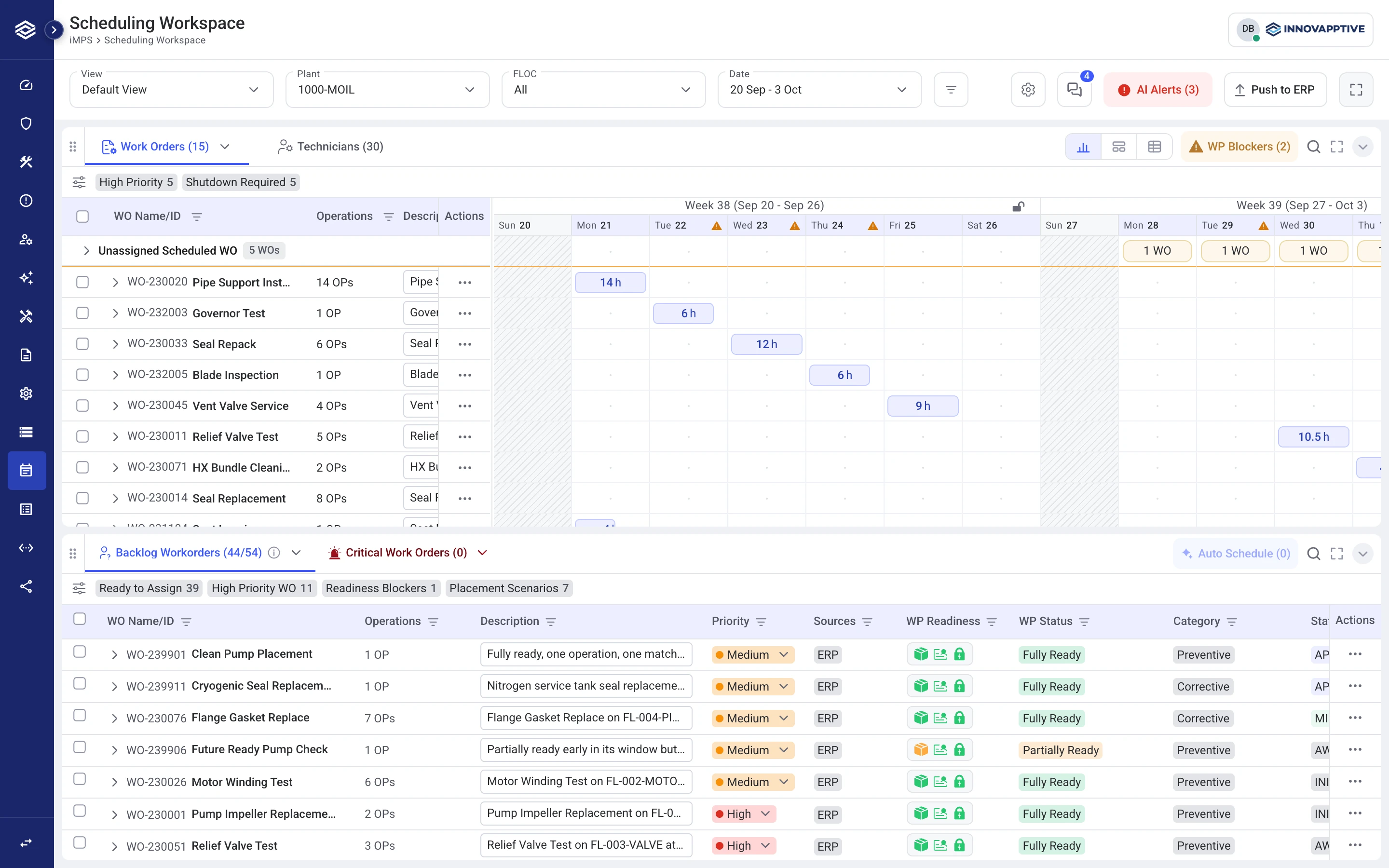
Show risk without blocking PlanningThe module where planners prepare work orders for execution: define the scope, gather requirements and prepare a work package when needed. Work is released to Scheduling after the required reviews. ahead.
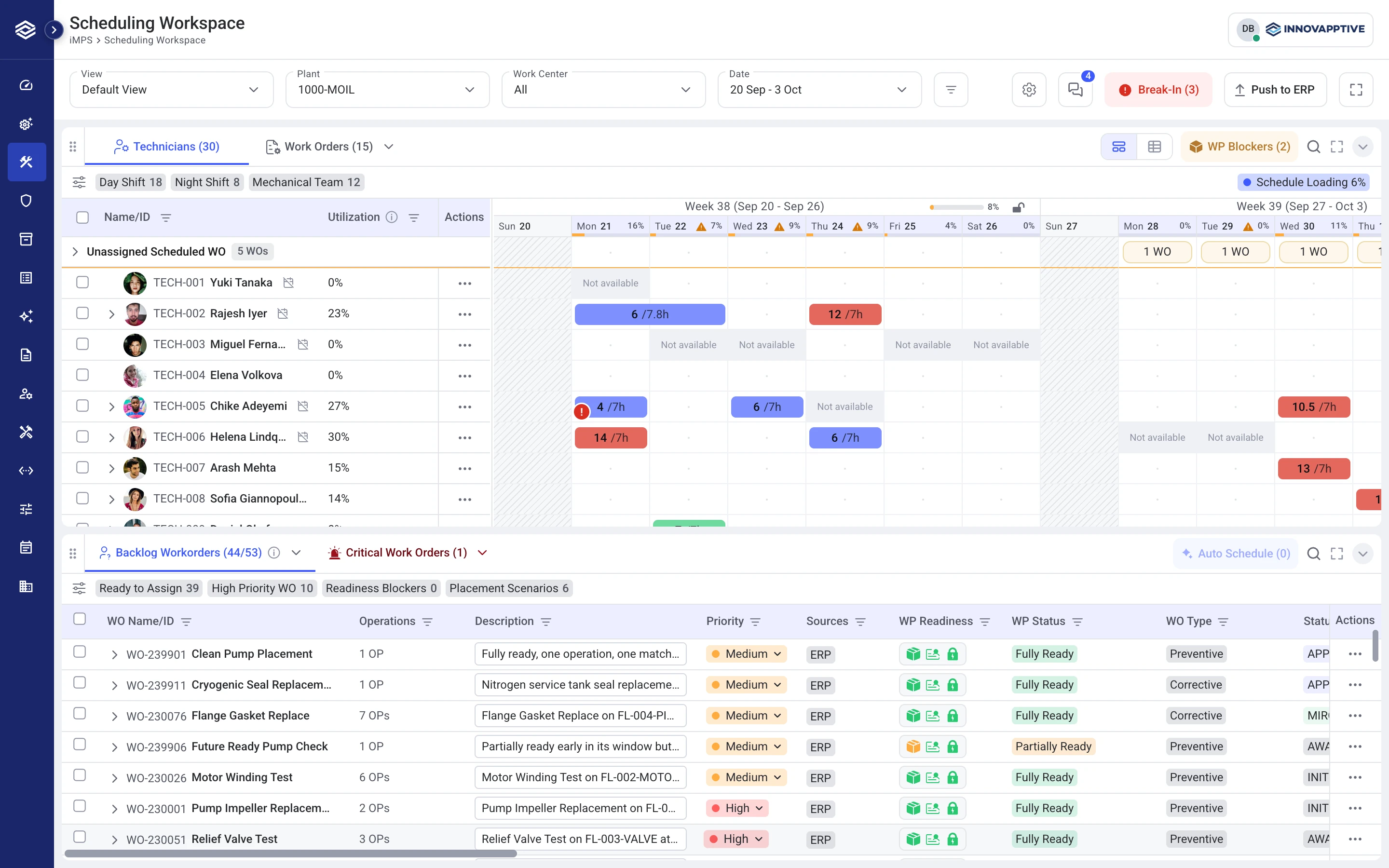
Outside the Basic Start Date and Basic End Date, a popup shows the date exception and offers Cancel or Schedule anyway.
View the date-override flow
Scroll sideways to read the full flow.
Auto Schedule: review the plan and its decisions.
Compare designs · Choose a screenshot to view.
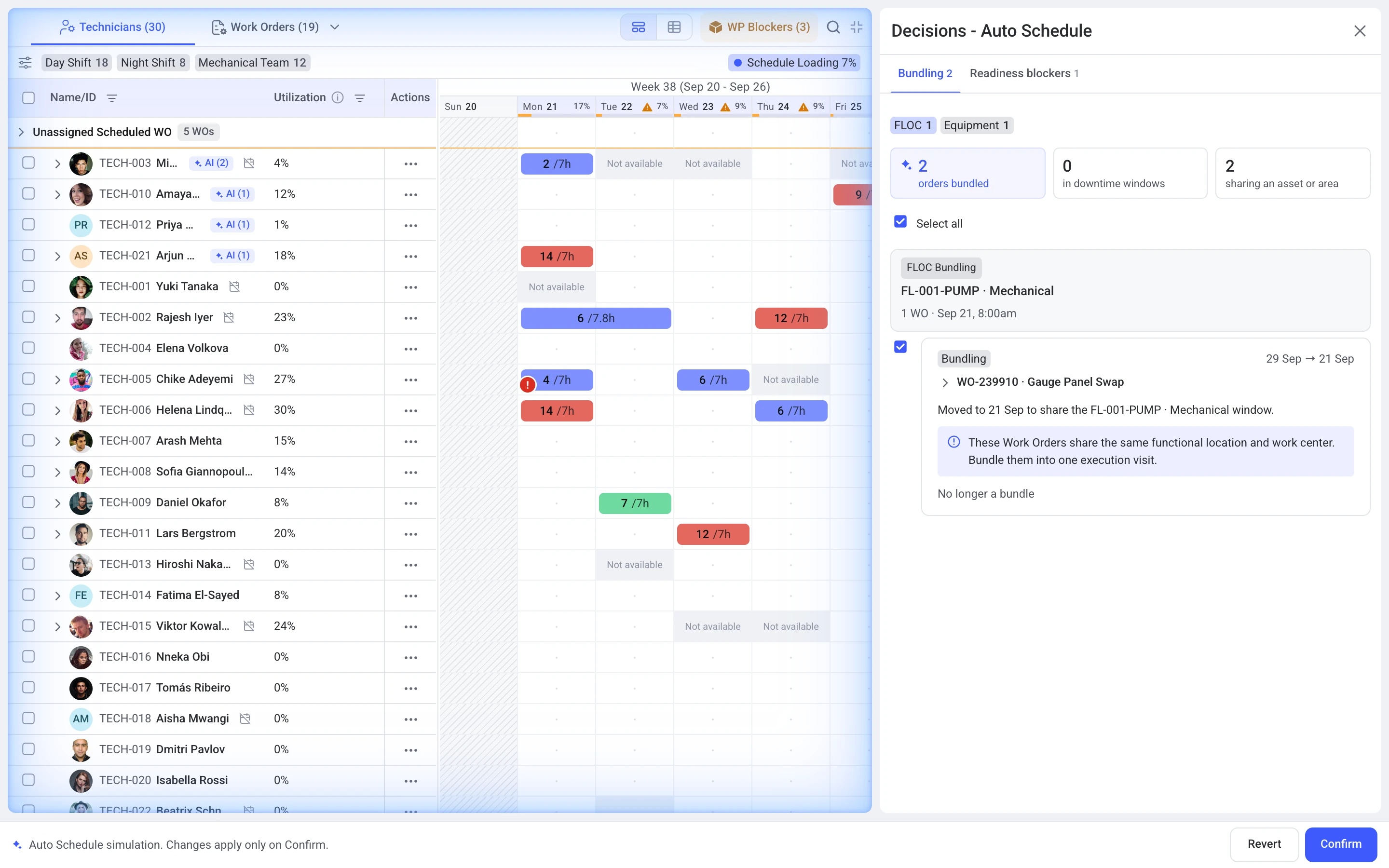
Maintenance schedulerDecides who will do the work and when, using released work orders, technician availability, readiness and downtime windows. can retract BundlingGrouping related work orders, such as work on the same equipment, so they can be considered together when scheduling. decisions. Pending PermitsFormal authorizations required for certain maintenance activities. remain ReadinessWhether the prerequisites for a job, such as materials, permits and isolation, are available. Pending prerequisites remain visible even when a scheduler reserves a future slot. findings. Accepting a proposal and freezing a week for ERP · Enterprise Resource PlanningThe business system that holds maintenance work orders and related records. This prototype represents handoffs to that system. transfer are separate confirmations.
Watch the prototype walkthrough
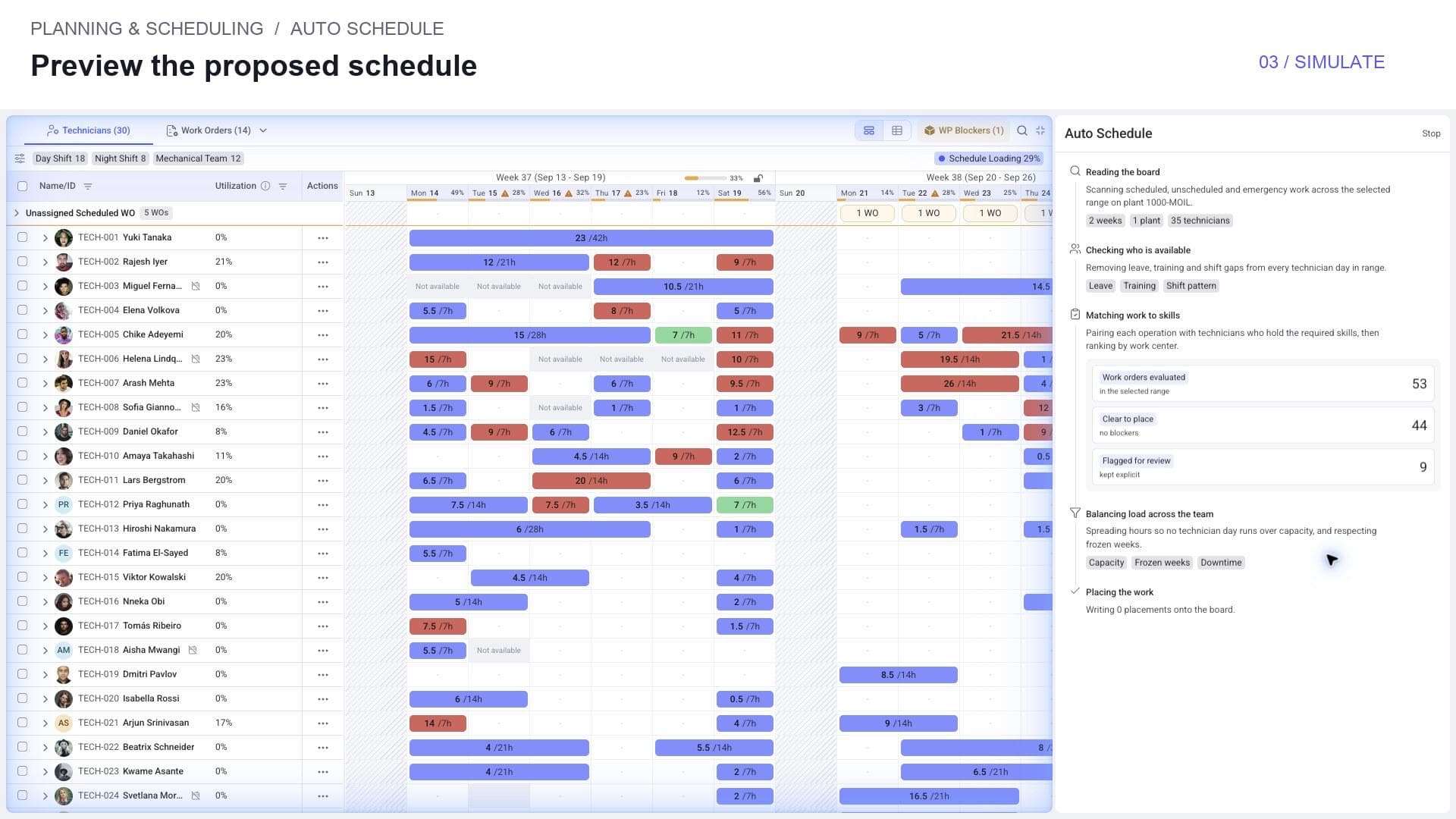
View the proposal-review flow
Scroll sideways to read the full flow.
Keep DowntimeA period when equipment is unavailable for normal operation. Maintenance work may need to fit within this window. events and dates visible together.
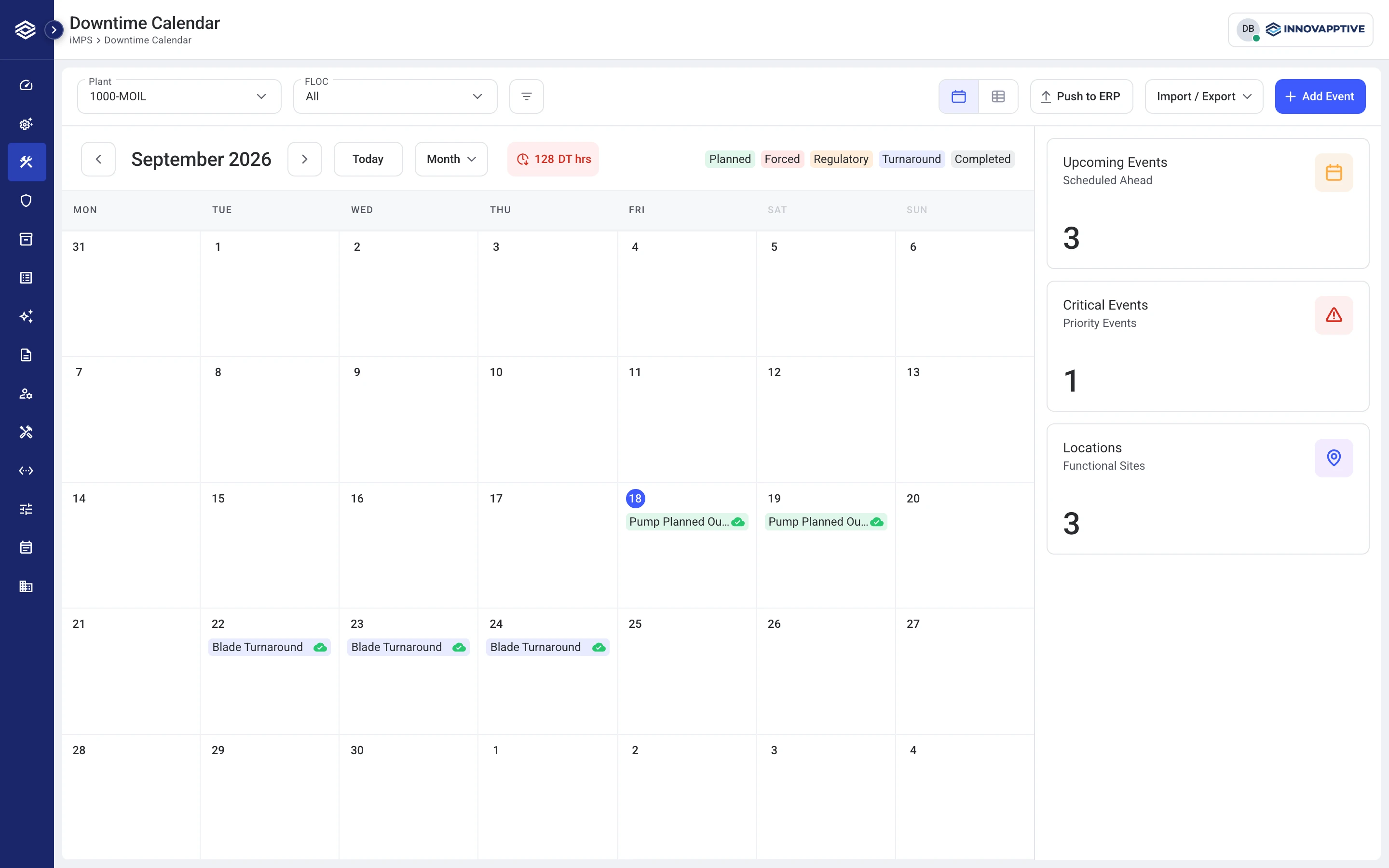
Summaries follow the visible dates and filters. Draft events reach SchedulingThe module where schedulers assign released work orders to technicians and time slots, considering availability, readiness and downtime windows. only after Push to ERP · Enterprise Resource PlanningThe business system that holds maintenance work orders and related records. This prototype represents handoffs to that system..
Give PM · Plant Maintenance OptimizationA review queue for proposed duration and frequency changes to preventive maintenance. Planners inspect the evidence and send selected recommendations to MDM. its own review space.
PM · Plant Maintenance OptimizationA review queue for proposed duration and frequency changes to preventive maintenance. Planners inspect the evidence and send selected recommendations to MDM. is an ongoing task. We separated it from individual AI Plan runs.
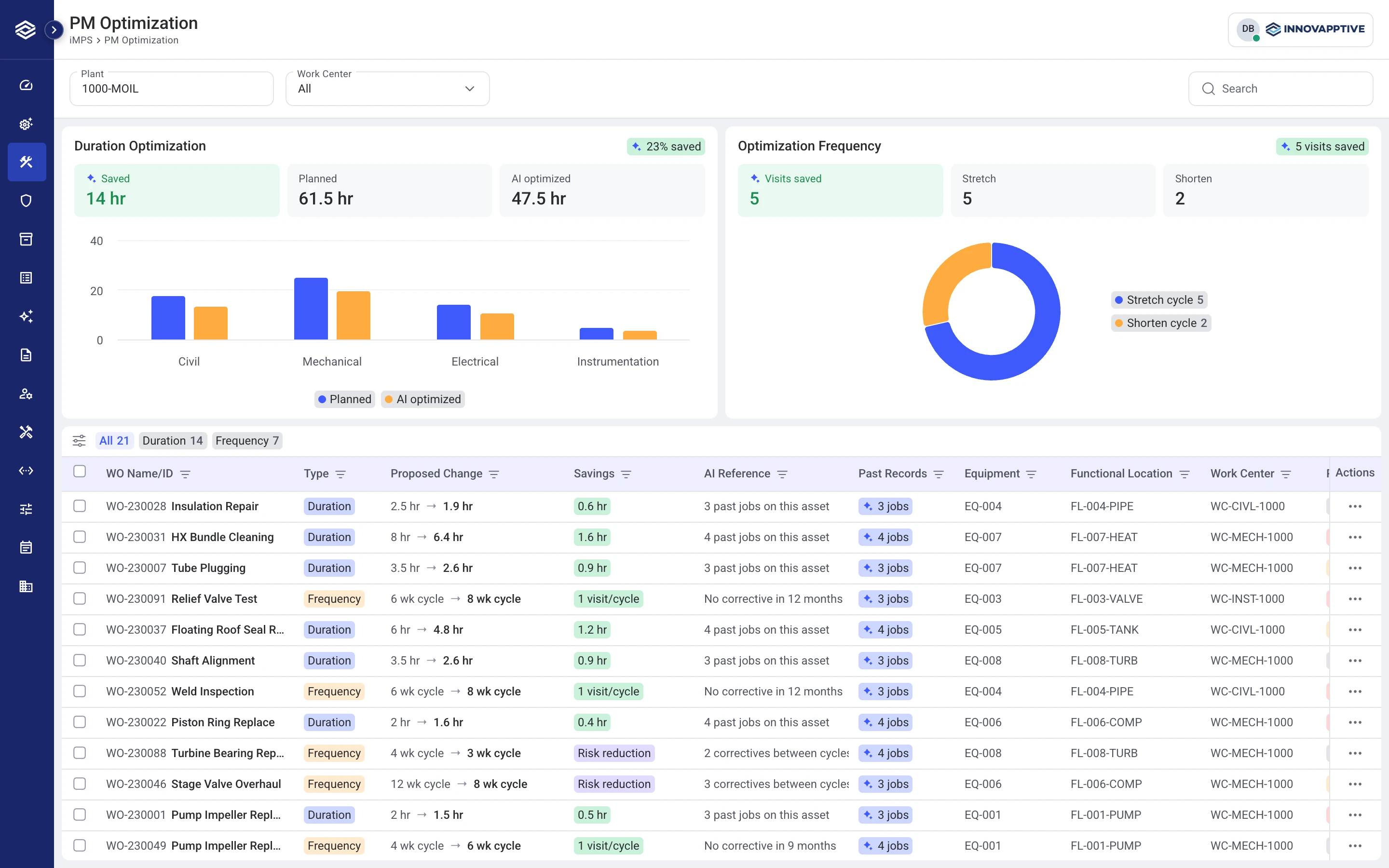
Eligible Preventive workPlanned maintenance carried out at defined intervals to help prevent equipment failure. work can enter directly; AI Plan can also add recommendations. Maintenance plannerPrepares what a maintenance job needs: its scope, operations, planned hours, parts, instructions, permits and isolation requirements. Releases work for scheduling when the required review is complete. choose Send to MDM · Master Data ManagementThe team that evaluates proposed changes to maintenance duration and frequency. In this project's intended workflow, approved changes update affected backlog work orders or apply when Planning releases them. or Reject.
Intended integration: after MDM · Master Data ManagementThe team that evaluates proposed changes to maintenance duration and frequency. In this project's intended workflow, approved changes update affected backlog work orders or apply when Planning releases them. approval, update existing Scheduling backlogReleased work orders waiting to be assigned to technicians and time slots. Work orderThe record of a maintenance job: what needs attention, on which equipment, its priority and its status. For example: replace a pump seal. or apply changes when PlanningThe module where planners prepare work orders for execution: define the scope, gather requirements and prepare a work package when needed. Work is released to Scheduling after the required reviews. releases them. This return path is not implemented in the prototype.
Develop: Build and review the interactions.
I contributed frontend work so stakeholders could review the interactions in a working prototype.
- Web prototype
- Angular
- Shared components
- CWP Design systemShared design rules and reusable components that help teams build consistent interfaces.
Connect preparation and SchedulingThe module where schedulers assign released work orders to technicians and time slots, considering availability, readiness and downtime windows.
I worked on shared tables and handoffs so released work could move from PlanningThe module where planners prepare work orders for execution: define the scope, gather requirements and prepare a work package when needed. Work is released to Scheduling after the required reviews. into the SchedulingThe module where schedulers assign released work orders to technicians and time slots, considering availability, readiness and downtime windows. Scheduling backlogReleased work orders waiting to be assigned to technicians and time slots..
Make recommendations reviewable
I brought proposal decisions beside the schedule so people could inspect changes before accepting them.
A prototype for stakeholder review
Built with Claude Code support. ERP · Enterprise Resource PlanningThe business system that holds maintenance work orders and related records. This prototype represents handoffs to that system. and MDM · Master Data ManagementThe team that evaluates proposed changes to maintenance duration and frequency. In this project's intended workflow, approved changes update affected backlog work orders or apply when Planning releases them. handoffs use demo behavior; production integration and measured outcomes are outside this case study.
Deliver: Prepare the work for delivery.
- Designs across four connected modules
I brought together PlanningThe module where planners prepare work orders for execution: define the scope, gather requirements and prepare a work package when needed. Work is released to Scheduling after the required reviews., SchedulingThe module where schedulers assign released work orders to technicians and time slots, considering availability, readiness and downtime windows., Downtime CalendarThe module for reviewing and managing periods when equipment is unavailable. Events reach Scheduling after Push to ERP, so maintenance can be coordinated with those windows. and PM · Plant Maintenance OptimizationA review queue for proposed duration and frequency changes to preventive maintenance. Planners inspect the evidence and send selected recommendations to MDM., keeping each role’s decisions clear.
- A working review prototype
I made the interactions available for stakeholder review, including work preparation, SchedulingThe module where schedulers assign released work orders to technicians and time slots, considering availability, readiness and downtime windows. proposals and date exceptions.
- Clear integration boundaries
The case study separates working frontend behavior from intended ERP · Enterprise Resource PlanningThe business system that holds maintenance work orders and related records. This prototype represents handoffs to that system. and MDM · Master Data ManagementThe team that evaluates proposed changes to maintenance duration and frequency. In this project's intended workflow, approved changes update affected backlog work orders or apply when Planning releases them. connections, so the prototype does not imply a production rollout.
Reviewed with stakeholders. ERP · Enterprise Resource PlanningThe business system that holds maintenance work orders and related records. This prototype represents handoffs to that system. and MDM · Master Data ManagementThe team that evaluates proposed changes to maintenance duration and frequency. In this project's intended workflow, approved changes update affected backlog work orders or apply when Planning releases them. handoffs are simulated; direct user-study results and measured business outcomes are not included.